
Sending money in and getting winnings out should never be complicated. On HOT77 it is not. Every payment method on the platform is built around how Pakistani players actually manage money — mobile wallets, local banks, and nothing else required.
Supported Payment Methods
| Method | Deposit | Withdrawal |
|---|---|---|
| JazzCash | Yes | Yes |
| EasyPaisa | Yes | Yes |
| Bank Transfer | Yes | Yes |
All transactions are processed in Pakistani Rupees. No currency conversion, no international fees, no crypto wallets needed.
How to Deposit on HOT77 — Step by Step
Step 1 — Log Into Your Account
Open the HOT77 app and log in with your registered mobile number and password.
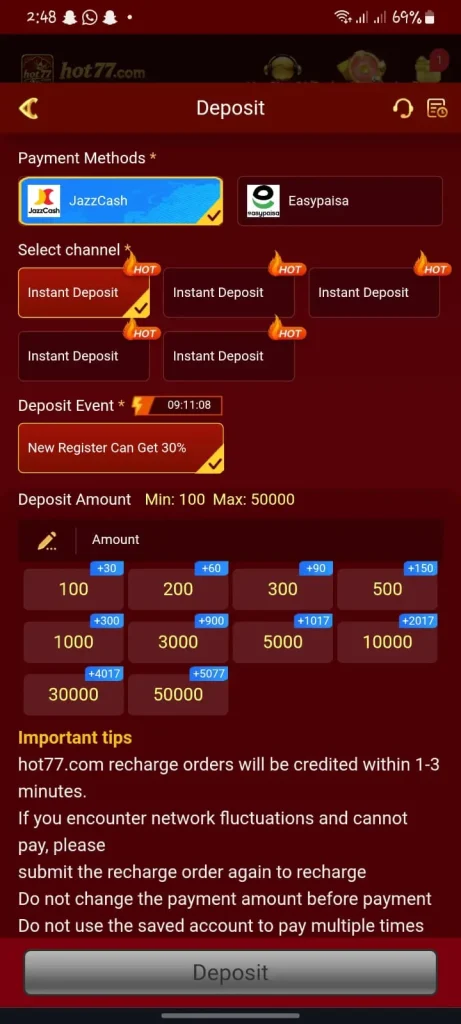
Step 2 — Go to the Deposit Section
Tap the Deposit button on your account dashboard.
Step 3 — Choose Your Payment Method
Select JazzCash, EasyPaisa, or Bank Transfer from the available options.
Step 4 — Enter the Amount
Type in the amount you want to deposit in Pakistani Rupees. Make sure it meets the minimum deposit requirement.
Step 5 — Complete the Payment
Follow the on-screen instructions to complete the transaction through your chosen payment method.
Step 6 — Balance Updated
Your HOT77 balance updates automatically once the payment is confirmed. This usually happens within a few minutes.
How to Withdraw on HOT77 — Step by Step
Step 1 — Log Into Your Account
Open HOT77 and log in to your account dashboard.
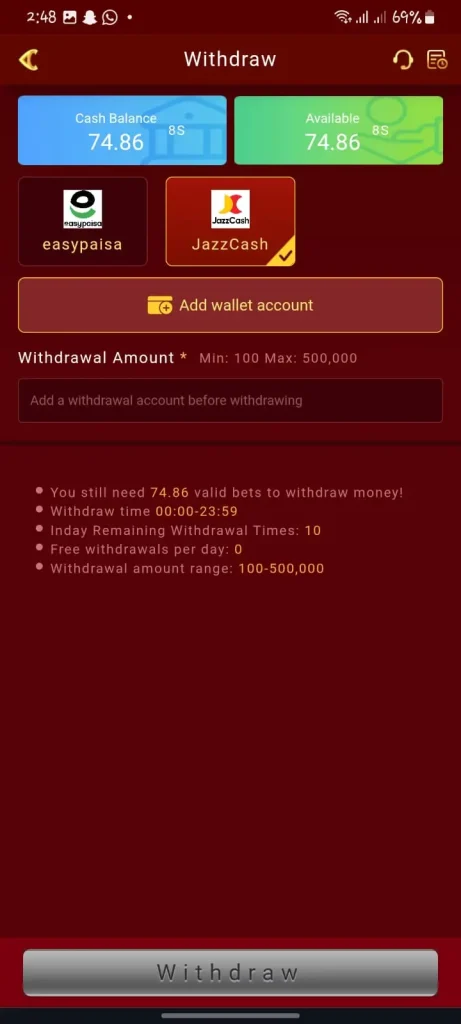
Step 2 — Go to the Withdrawal Section
Tap the Withdraw button from your account menu.
Step 3 — Select Withdrawal Method
Choose JazzCash, EasyPaisa, or Bank Transfer — whichever is linked to your account.
Step 4 — Enter Withdrawal Amount
Type the amount you want to withdraw. Make sure your balance meets the minimum withdrawal limit.
Step 5 — Confirm Your Request
Review the details and confirm. Your withdrawal request is submitted instantly.
Step 6 — Receive Your Money
JazzCash and EasyPaisa withdrawals typically clear within a few hours. Bank transfers may take up to one business day depending on your bank.
Deposit and Withdrawal Limits
| Type | Minimum | Maximum |
|---|---|---|
| Deposit | 100 | 49,999 |
| Withdrawal | 100 | 49,999 |
For the latest minimum and maximum amounts contact HOT77 support directly via live chat or WhatsApp.
Common Payment Issues and Fixes
Deposit not reflecting in balance
Wait a few minutes and refresh your account. If the balance still has not updated contact HOT77 support with your transaction reference number.
Withdrawal request pending too long
Requests submitted during off-peak hours may take slightly longer. If your withdrawal has been pending for more than 24 hours contact support immediately.
Wrong account number entered
Double check your JazzCash or EasyPaisa number before confirming any withdrawal. HOT77 is not responsible for transfers sent to incorrect numbers.
Payment method not available
Make sure your JazzCash or EasyPaisa account is active and verified. Inactive mobile wallet accounts can block transactions.
Tips for Faster Transactions
- Always use the mobile number linked to your HOT77 account for payments
- Submit withdrawal requests during business hours for fastest processing
- Keep your JazzCash and EasyPaisa accounts active and verified at all times
- Save your transaction reference numbers for every deposit and withdrawal
Download HOT77 today, make your first deposit, and claim your welcome bonus before your very first game.
Reminder: Only deposit amounts you can comfortably afford. Never use money reserved for daily expenses or family needs for gaming purposes.